Overview
- The network layer only knows how to deliver data to the correct computer (host-to-host)
- Multiplexing and demultiplexing are the transport layer mechanisms that bridge the final gap to send data to the specific app (process-to-process).
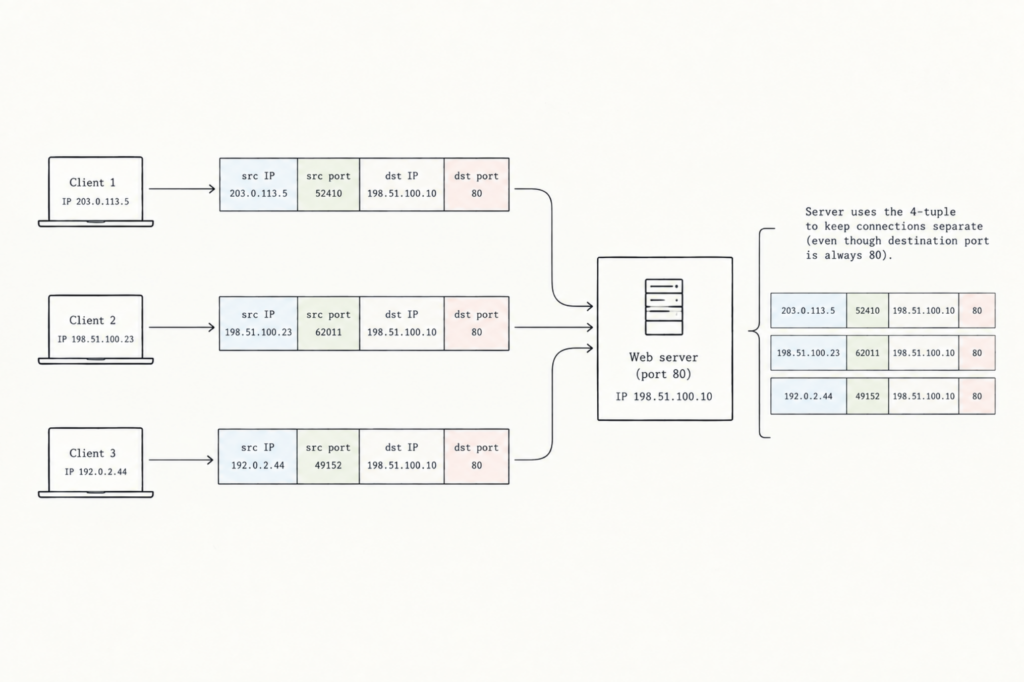
- Multiplexing: Gathers data from all your different running apps, attaches port numbers, and combines them into one stream to send down to the network layer.
- Demultiplexing: Takes incoming network data, reads those port numbers, and splits the stream back up so each piece lands in the exact app expecting it.
- Together, they transform basic computer-to-computer transport into precise app-to-app communication.
Example
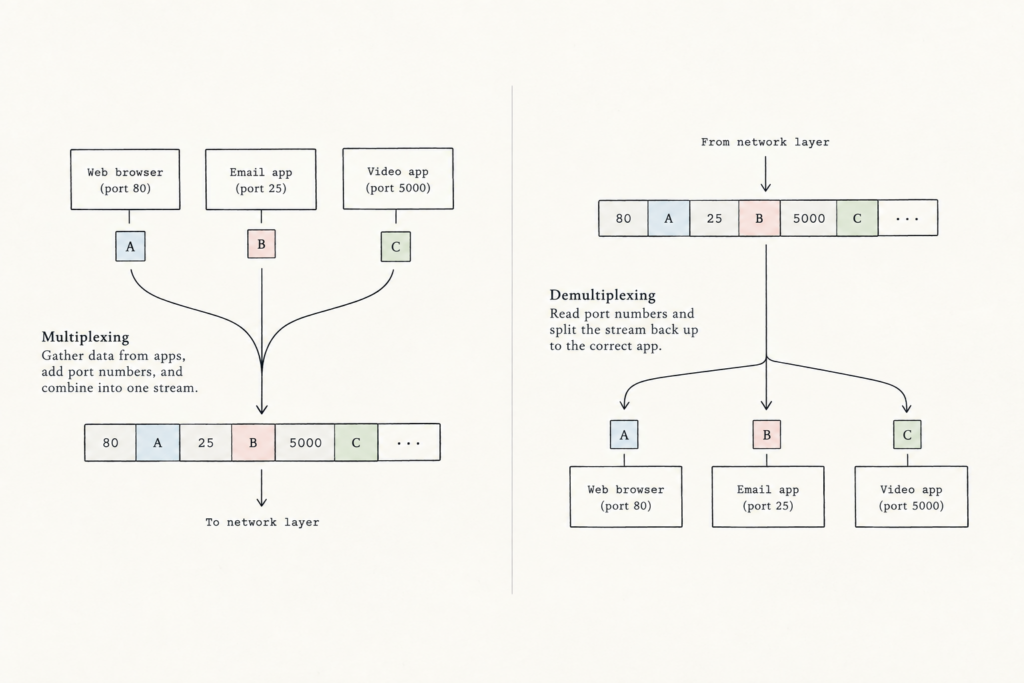
- On your computer you may be downloading web page (a HTTP process) while running one Zoom sessions and two ssh sessions.
- So you have 4 network application processes running.
- When the transport layer in your computer receives data from the network layer below, it needs to direct received data to one of these four processes
- It’s important to note that the transport layer doesn’t directly deliver data to a process, but instead goes through an intermediary socket.
- So the receiving host must direct an incoming transport layer segment (i.e. chunk of data) to the appropriate socket.
- To do this, each transport-layer segment has a set of fields in the segment for this purpose
- At the receiving end, the transport layer looks at these fields to identify the receiving socket and then sends the segment to that socket.
- This job of delivering the data in a transport-layer segment to the correct socket is called demultiplexing.
- The job of gathering the data chunks at the source from different sockets, encapsulating each data chunk with header information (that will late be used in demultiplexing) to create segments, and passing the segments to the network layer is called multiplexing.
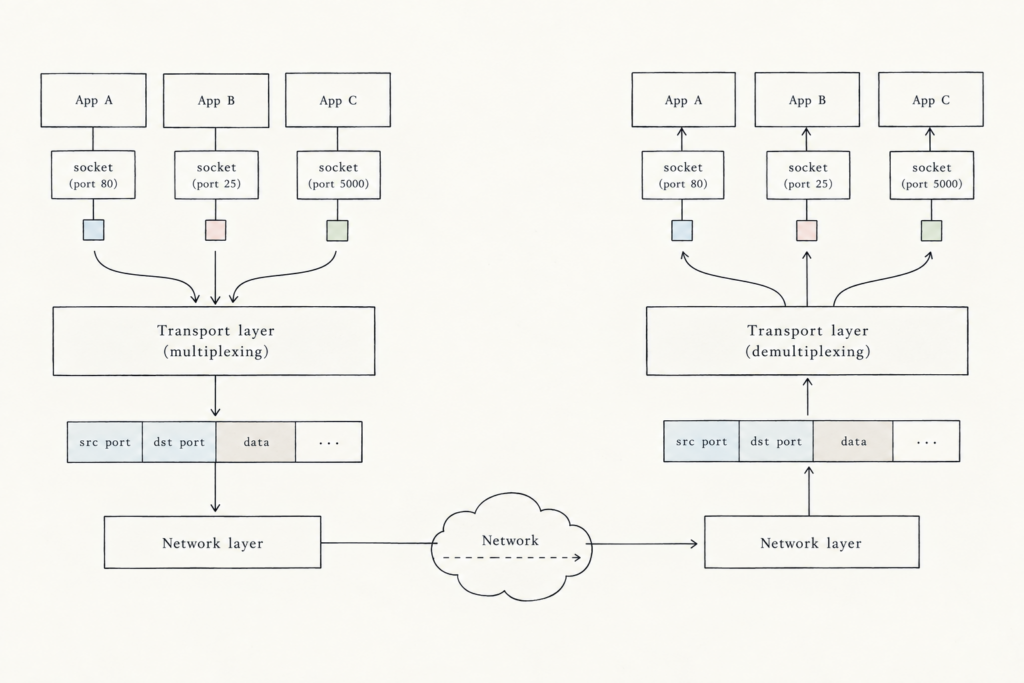
- So transport-layer multiplexing requires (1) that sockets have unique identifiers and (2) that each segment have special fields to indicate the sockets to which the segment is to be delivered.
- These special fields are the source port number field and the destination port number field.
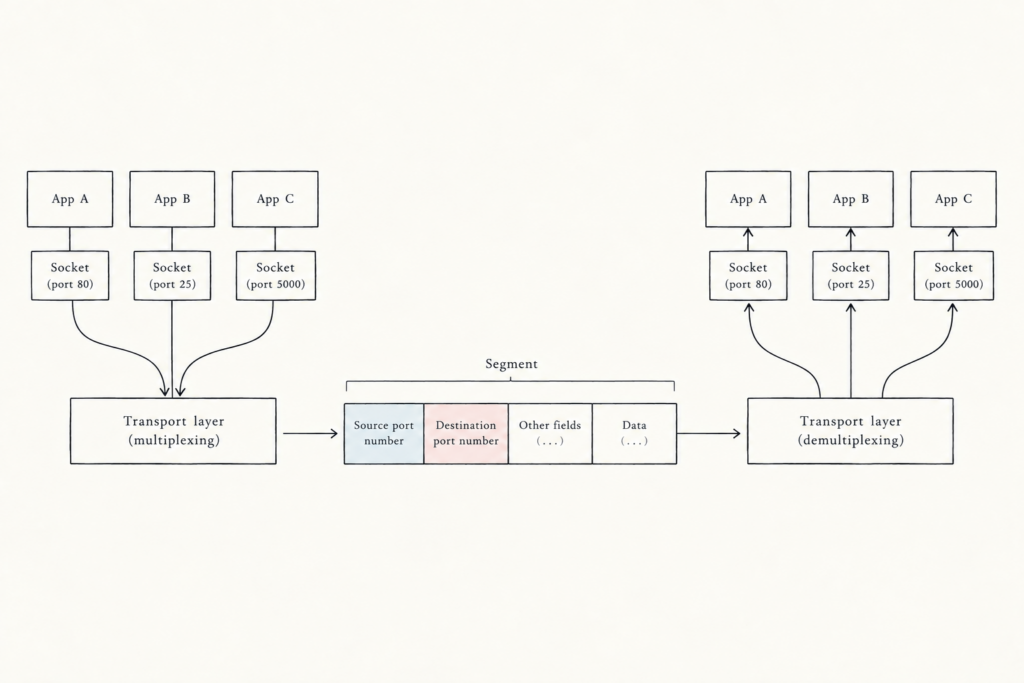
- Each port number is a 16-bit number, ranging from 0 to 65535.
- The port numbers ranging from 0 to 1023 are called well-known port numbers and are restricted, because they’re reserved for well-known application protocols such as HTTP (which uses port number 80).
- When developing a new application, we must assign the application a port number.
Connectionless Multiplexing and Demultiplexing with UDP
- When creating a UDP socket, the transport layer automatically assigns a port number to the socket (in the range 1024 to 65535, not currently being used by any other UDP port in the host). We could set a number manually too.
- UDP muliplexing and demultiplexing in detail:
- If a process in host A (with UDP port 22157) wants to send a chunk of data to a process to host B (with UDP port 52897), the transport layer in host A creates a transport layer segment that includes the data, the source port number (22157) and the destination pot number (52897), plus 2 other values discussed later.
- The transport layers passes the segment to the network layer
- The network later encapsulates the segment in an IP datagram to make a best-effort delivery of the segment to the receiving host.
- If the segment is received by host B, the transport layer at the receiving host examines the port number in the segment (52897) and delivers the segment to the society identified by that port number.
- As UDP segments arrive from the network, host B directs (i.e. demultiplexes) each segment to the appropriate socket by examining the segment’s destination port number.
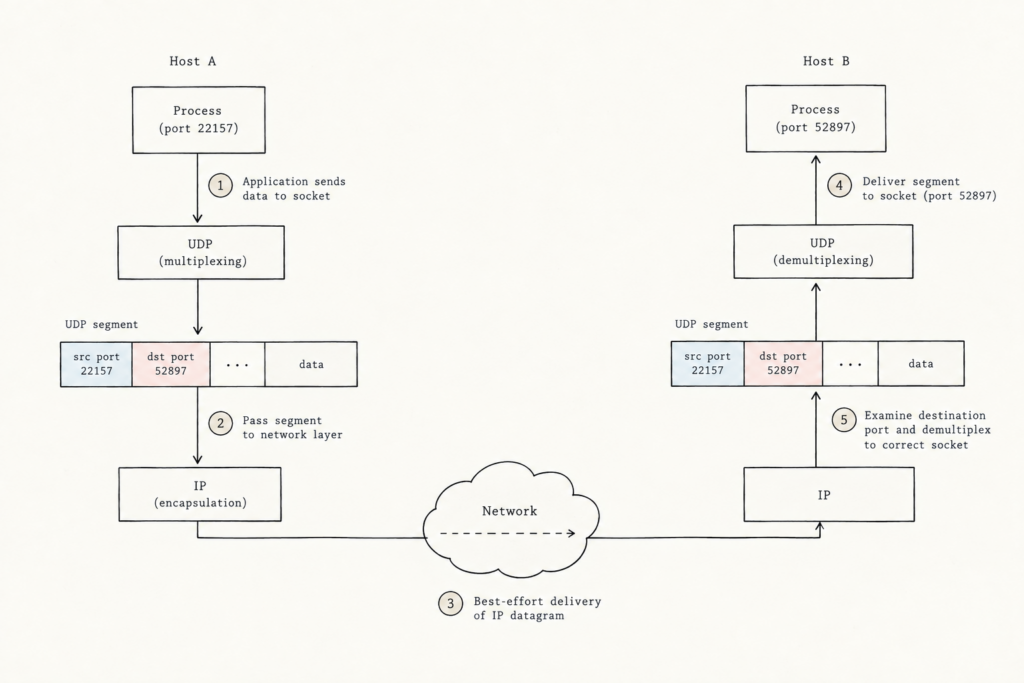
- The source port number serves as part of a ‘return address’ – when host B wants to send a segment back to host A, the destination port in the B-to-A segment will take its value from the source port value of the A-to-B segment.
- The complete return address is A’s IP address and the source port number.
Connection-Oriented Multiplexing and Demultiplexing with TCP
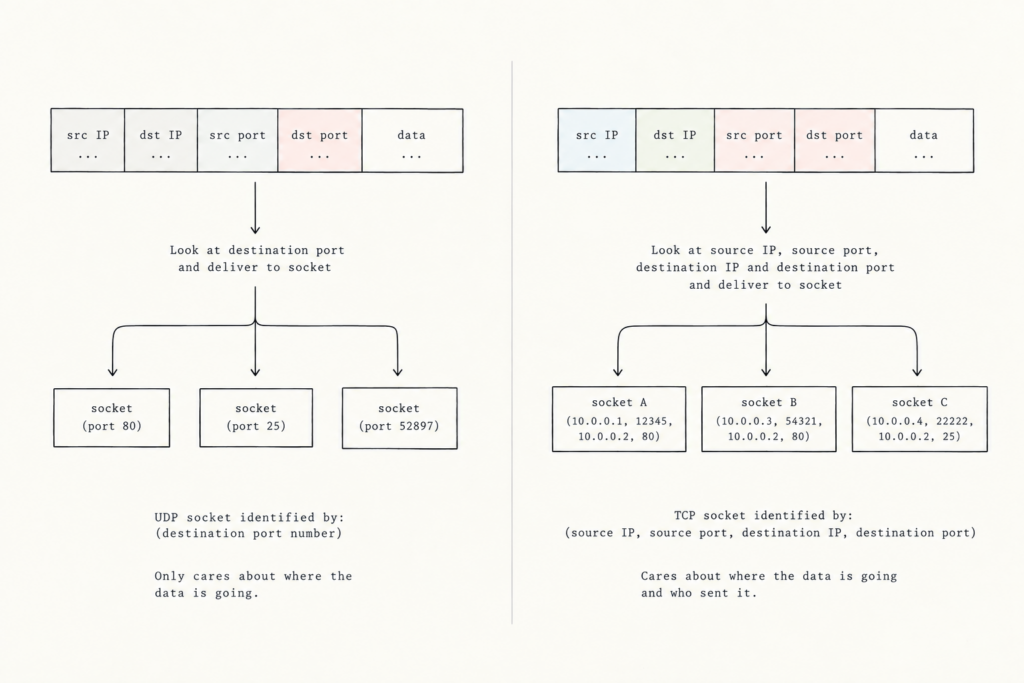
- One small difference between a TCP socket and a UDP socket is that a TCP socket is identified by a four-tuple:
- So UDP uses a 2-part ID. It only checks the destination ID and the destination port. In other words, a UDP socket only cares about where the data is going.
- Whereas TCP uses a 4-part ID. It checks source IP address, source port number, destination IP address, and destination port number. In other words, a TCP socket cares about where the data is going AND who sent it.
- So when a host receives a TCP segment, it uses all four values to direct (i.e. demultiplex) the segment to the correct socket.
- This means (unlike with UDP) that two arriving TCP segments with different source addresses or source port numbers will be directed to two different sockets, even if they have the same destination IP or destination port number.
Security: Port Scanning
- Servers wait for network traffic on specific ‘doors’ called ports, and certain applications always use the same port numbers (e.g. web traffic on Port 80 or MS SQL on UDP Port 1434).
- Finding an open port usually tells you exactly what application is running behind it.
- For system administrators this is useful. They can monitor which applications are active on their network and close any ports that shouldn’t be open.
- But, attackers can look for open ports to identify running applications. If an application has a known security flaw (e.g. the Slammer worm exploited on MS SQL), the attacker can use that bug to break into the computer.
- Anyone can use a port scanner (the most famous being Nmap) to check a target computer anywhere on the internet
- Nmap systematically ‘knocks’ on TCP and UDP port numbers one by one to see if anything responds.
- It then returns a report showing which ports are open (i.e. an application is running), closed (i.e. reachable, but no application is listening), and unreachable (i.e. blocked by a firewall or network issue).
Web Servers and TCP
- Imagine a host running a web server (such as Apache Web server) on port 80.
- When clients (e.g. browsers) send segment to the server, all segments will have destination port 80
- Even though many people may try to connect to the same website using destination port 80, the server never mixes anyone up
- Your browser automatically picks a random temporary source port (like 52410) on your computer, paired with your unique source IP address.
- The web server checks the complete 4-tuple (source IP, source port, server IP, port 80). Because every client has a different IP address or source port, the transport layer can easily direct incoming data to the correct, private connection