
Overview
- The transport layer gives applications (e.g. browsers and web servers) the illusion that they’re directly wired together, even if they’re thousands of miles away, so data can move between them.
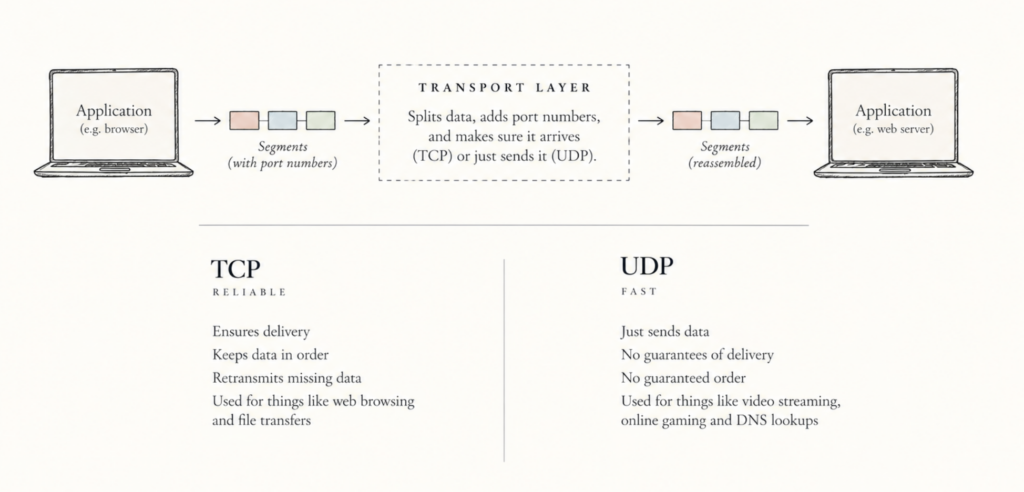
- Overview of how data is packaged and delivered:
- If an app send a large file, the transport layer chops that big message into smaller pieces (called segments) and gives a transport header into each one (like putting tracking labels on boxes in the post)
- The transport layer hands these segments down to the Network Layer, which wraps them in an envelope with an IP address and send them out
- Middle routers on the intenet only care about the IP address. They never inspect what’s inside the transport layer segment istelf.
- When the destination computer receives the envelopes, its transport layer unboxes the segments, puts the pieces back together in order, and hands the complete message up to the receiving app
- Your apps can usually choose between two different transport layer protocols:
- TCP: guarantees that every single piece arrives safely and in exact order. If a segment gets lost, it re-sends it. (Used for web browsing, emails, file downloads).
- UDP: Sends data as fast as possible without checking if it arrives or tracking order. Doesn’t waste time on retries. (Used for live video streaming, online gaming, voice calls).
Relationship Between Transport and Network Layers
- The transport layer sits above the network layer in the protocol stack
Protocol Stack
A protocol stack is a hierarchical set of network communication rules that work together to allow reliable and efficient data exchange between computing devices. Each layer performs specific functions building on the services of the layer below it while providing services to the layer above it.
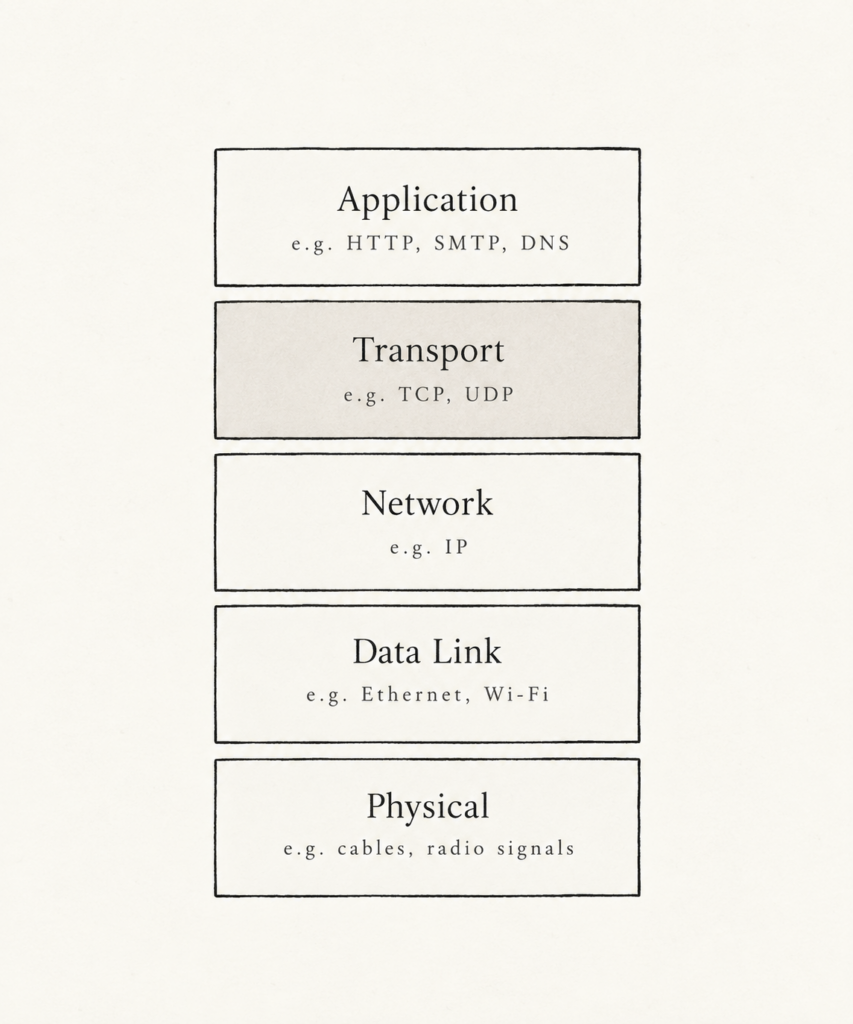
- The Network layer is host-to-host (e.g. between physical computers, servers, smartphones etc.), meaning it does the heavy lifting to get data across the internet to your exact laptop, for instance.
- The Transport Layer is process-to-process (e.g. between the specific app running on the device, like Chrome, Spotify or a multiplayer game), meaning its responsible for the incoming data going to your Zoom call and not accidentally to your web browser, for instance.
Useful analogy
- Let’s say we have two houses with 10 people in each – one in the UK and one in Portugal.
- These people enjoy writing to each other so they each send separate letters in the post weekly to each of the 10 occupants of the other household (so each house receives 100 letters from the other house).
- Each house nominates one person (Gareth in the UK and Millie in Portugal) who is responsible for sorting the mail. So Gareth, for example, is responsible for posting all the letters on behalf of the UK house and distributing all the incoming letters from Portugal to his household too.
- In this example, the postal service provides logical communication between the two houses (it moves post from house to house, not person to person), whereas logical communication between the people in the household is done by Gareth and Millie.
- From everyone else’s perspective, Gareth and Millie appear to be the mail service, but they’re only a part (the end-system part) of the end-to-end delivery process.
| Computer Networking | Analogy |
|---|---|
| Application messages | Letters in envelopes |
| Processes | Household members |
| Hosts (i.e. end systems) | Houses |
| Transport layer protocol | Gareth and Millie |
| Network layer protocol | Postal service (including mail carriers) |
- So, the transport-layer protocols live in the end systems moving messages from the application process to the network layer and vice versa, but it doesn’t have any say on how messages move in the network core.
- Extending the analogy above, it’s possible for two different people to be responsible for the mail in each household and do things in different ways (e.g. distribute mail less frequently). Similarly, a computer network can use multiple transport protocols, with each offering a slightly different service to applications.
- The services of the transport layer are often constrained by the network layer e.g. if there are delays in the network layer, the transport layer can’t do anything to speed things up
Transport Layer in the Internet
- There are two transport-layer protocols available to the application layer
- UDP (User Datagram Protocol): this provides an unreliable, connectionless service to the invoking application
- TCP (Transmission Control Protocol): this provides a reliable, connection-oriented service to the involving application
- When designing a network application, the application developer must decide which of these transport protocols to use.
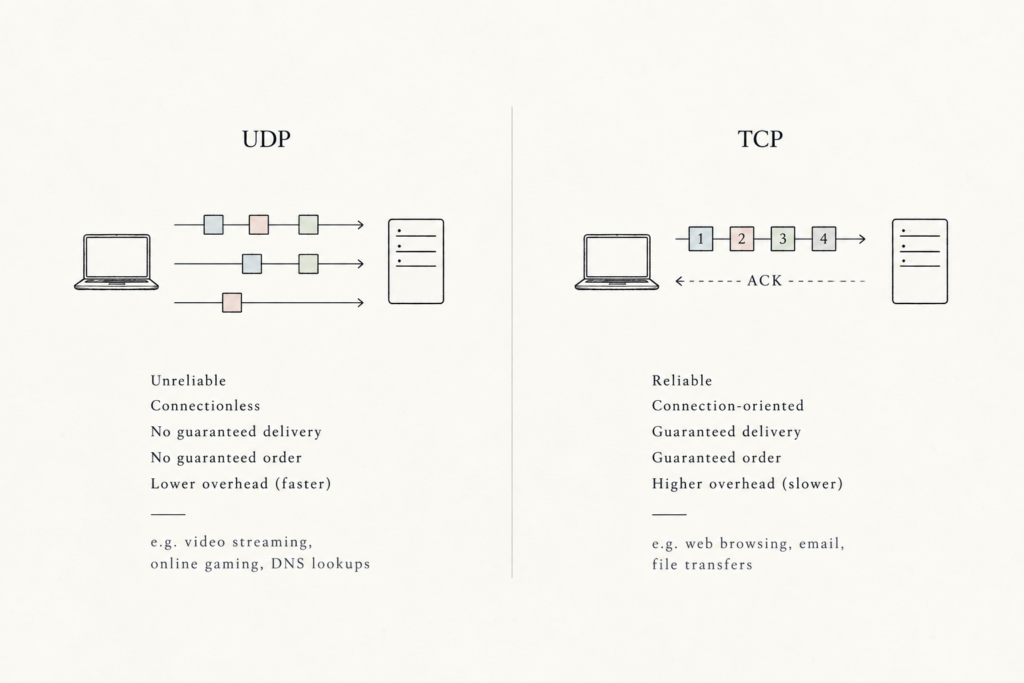
- When an application sends data, it’s often too large to travel across the network all at once. So, the transport layer takes the stream of data from the application and chops it into smaller chunks called segments.
- You might sometimes see the word datagram used instead, but that term is better used for the network-layer packet.
The Internet’s Network Layer (IP)
- The name of the Internet’s network-layer protocol is IP (Internet Protocol).
- IP provides logical communication between hosts
- IP uses a best-effort delivery service, meaning it doesn’t guarantee segment delivery or the integrity of that data either. So IP is said to be an unreliable service.
- Every host has at least one IP address (i.e. a network-layer address).
- So IP gets data to the correct computer, while TCP and UDP get that data to the correct program running on that computer.
- An IP address can identify a device on a network, but a single device can run dozens of applications. If IP only delivers data to the computer, the computer wouldn’t know which application should receive which piece of data.
- So TCP and UDP add port numbers to identify specific applications (processes) and, therefore, extend IP’s delivery service from just the device to the specific programs running on the end systems.
- It does this through transport-layer multiplexing and demultiplexing.
- TCP and UDP also provide integrity by detecting errors in their segments’ headers.
Key Differences Between UDP and TCP
- UDP (Minimal & Unreliable):
- Provides only process-to-process delivery and error checking.
- Gives no guarantees that data will arrive intact, in order, or at all.
- Sends data at whatever speed the application chooses without regulating traffic.
- TCP (Reliable & Complex):
- Reliable data transfer. Uses sequence numbers, acknowledgments, timers, and flow control to ensure data arrives complete and in order.
- Congestion control. Throttles transmission speed to prevent network overload, protecting overall internet performance.