
- UDP does as little as a transport protocol can do. Aside from the multiplexing and demultiplexing function and some light error checking, it adds nothing to IP (the network protocol).
- UDP takes messages from the application process, attaches source and destination pot number fields for the multiplexing/demultiplexing service, adds two other small fields, and passes the resulting segment to the network layer.
- The network layer encapsulates the transport-layer segment into an IP datagram and makes a best-effort attempt to deliver the segment to the receiving host.
- If the segments arrives at the receiving host, UDP uses the destination port number to deliver the segment’s data to the correct application process.
- With UDP there’s no handshaking between sending and receiving transport-layer entities before sending a segment, which is why UDP is said to be connectionless.
Example: DNS
- DNS is an application-layer protocol that typically uses UDP.
- When your computer needs to turn a website name (e.g. google.com) into an IP address, the DNS application sends a request message using UDP asking for Google’s IP address.
- UDP takes the message, gives it a header with the destination port number (port 53, the standard port for DNS servers), and immediately passes it down to the network layer to be sent across the internet.
- As UDP is fast, it gets the answer back in milliseconds without the extra overhead of establishing a full TCP connection first.
Why build an application over UDP rather than TCP, which provides a reliable data transfer? There are a few reasons:
- Finer control over what data is sent and when
- UDP immediately sends data to the network layer as soon as it’s packaged into a segment.
- TCP prioritises reliability over speed, so will often implement congestion control (intentionally slowing down the transmission rate to avoid crashing the network) and will continue trying to send data until it has been received, regardless of how long that takes.
- This is bad in live video calls or multiplayer games where you need a continuous stream of fresh data, you’re not too worried if a single video frame or microsecond of audio is lost, and delay is terrible (e.g. conversation lag).
- By using UDP, real-time apps get a fast, “no-frills” delivery line. If developers need a tiny bit of reliability (like making sure a player’s button press gets through), they can program that specific check directly into their own app code rather than using TCP’s heavy, slow rules.
- No prior connection needed
- TCP requires a three-way handshake before it starts to transfer data, UDP doesn’t.
- TCP connection-establishment delay in HTTP is why you often experience downloading Web documents. This is why HTTP3 uses the QUICK protocol, which uses UDP as its underlying transport protocol.
- No connection state
- TCP maintains a connection state between end systems (e.g. your laptop and a web server).
- So when a client connects over TCP, the server must allocate RAM to maintain that connection state. This includes memory of incoming/outgoing data (i.e. buggers) and traffic control variables.
- Because of this a TCP server can eventually run out of memory when too many people connect at once.
- UDP has no connection state, meaning when a server receives a UDP packet it process es the data instantly so can handle vastly more simultaneous clients.
- Small packet header overhead
- The TCP segment has 20 bytes of heaver overhead in every segment. UDP has only 8 bytes of overhead.
| Application | Application-Layer Protocol | Underlying Transport Protocol |
| Electronic mail | SMTP | TCP |
| Remote terminal access | Telnet | TCP |
| Secure remote terminal access | SSH | TCP |
| Web | HTTP, HTTP/3 | TCP (for HTTP), UDP (for HTTP/3) |
| File transfer | FTP | TCP |
| Remote file server | NFS | Typically UDP |
| Streaming multimedia | DASH | TCP |
| Internet telephony | typically proprietary | UDP or TCP |
| Network management | SNMP | Typically UDP |
| Name translation | DNS | Typically UDP |
- Where TCP is preferred:
- Email, remote terminal access, and file transfer run over TCP, as all these applications need reliable data.
- Early versions of HTTP ran over TCP. More recent versions of HTTP run over UDP (providing their own error control and congestion control at the application layer).
- Where UDP is preferred:
- Network management prefers UDP. This is because network management applications need to run when the network is in a stressed state (precisely when reliable data transfer is hard to achieve).
- DNS also usually runs over UDP.
- While UDP provides less reliable data transfer in general, we can make it more reliable by building reliability into the application itself.
- For example, HTTP3’s QUIC protocol implements reliability into the application-layer on top of UDP.
UDP Segment Structure
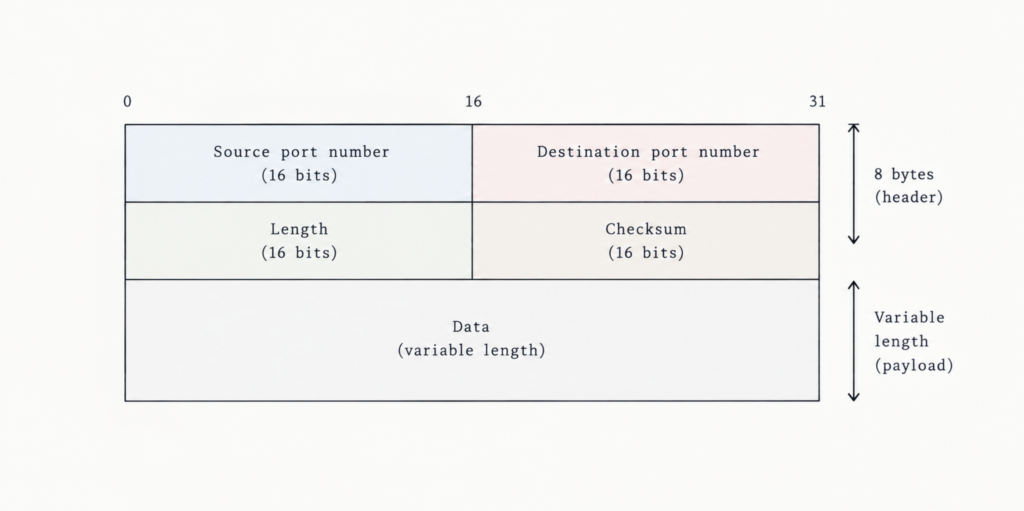
- The application data is in the data field of the UDP segment.
- E.g. the query/response message for DNS or the audio samples for a streaming audio application.
- The UDP header had 4 fields (each of 2 bytes).
- As seen in the notes on multiplexing, the ports numbers ensure the data is sent to correct process on the destination end system.
- The length field specifies the number of bytes in the UDP segment (header plus data). This is needed since the size of the data field may differ from one UDP segment to the next.
- The checksum is used by the receiving host to check if there are any errors in the segment.
UDP Checksum
- The UDP checksum provides for error detection i.e. it checks whether bits in the UDP segment have changed or were corrupted as it moved from across the network.
- UDP checksum process:
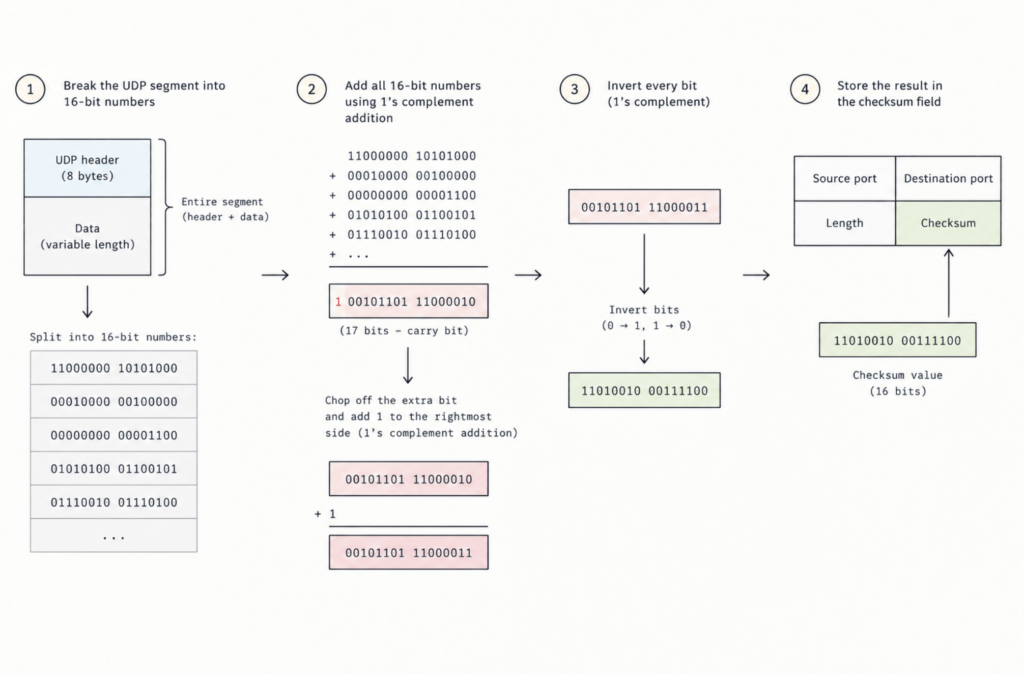
- The sender breaks the entire UDP segment (header + data) into 2-byte (16-bit) binary numbers
- The sender adds all these 16-bit numbers up. If the addition produces a carry bit that spills past 16 bits (creating a 17th bit), you just chop off that extra bit and add 1 back to the rightmost side of the total.
- Take the final 16-bit sum and invert every bit (i.e. turn all 0s into 1s and all 1s into 0s)
- This inverted results is saved inside the 16-bit checksum field in the UDP header.
- Why do this?
- When the receiver gets the packet, it performs the exact same 16-bit addition on everything, including the checksum value itself
- Because the checksum is the exact inverse of the original sum, adding them together should result in a 16-bit number made entirely of ones (11111111 11111111)
- If the result is all 1s, the data arrived intact. If there’s a 0 in the result, at least one bit was corrupted during transmission, so UDP discards the packet.